
Flutter Architecture
Intro
I am going to try and use the Flutter app architecture outlined by Andrea, in their architecture guide. I have used their guides in the past, and it always seems to be pretty good. As someone with a background in backend and API development, my approach is to work from the API up towards the UI.
Then based on this architecture, I will use the project structure outling by their project structure guide.
Architecture
Overview
Architecture diagrams
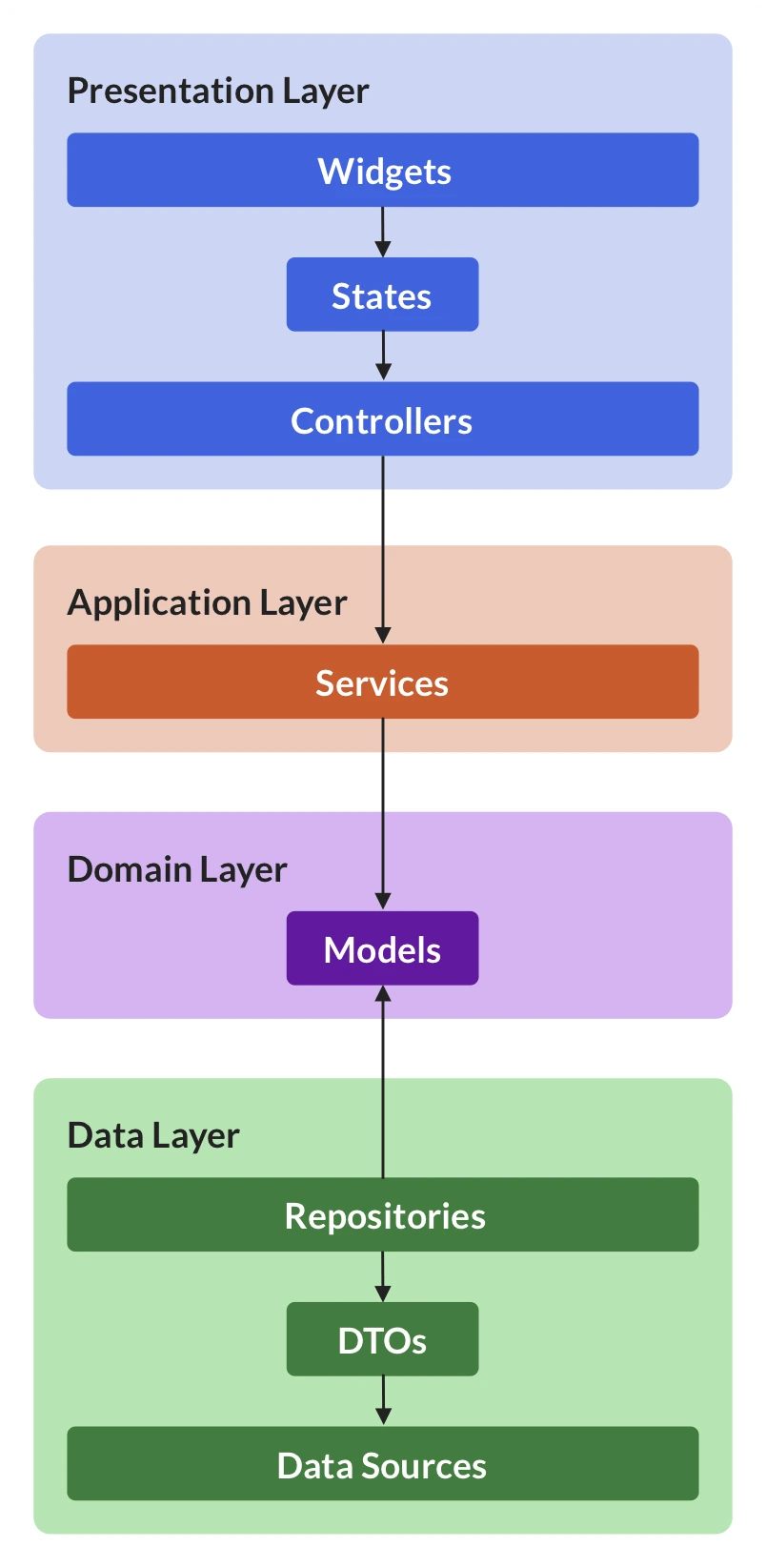
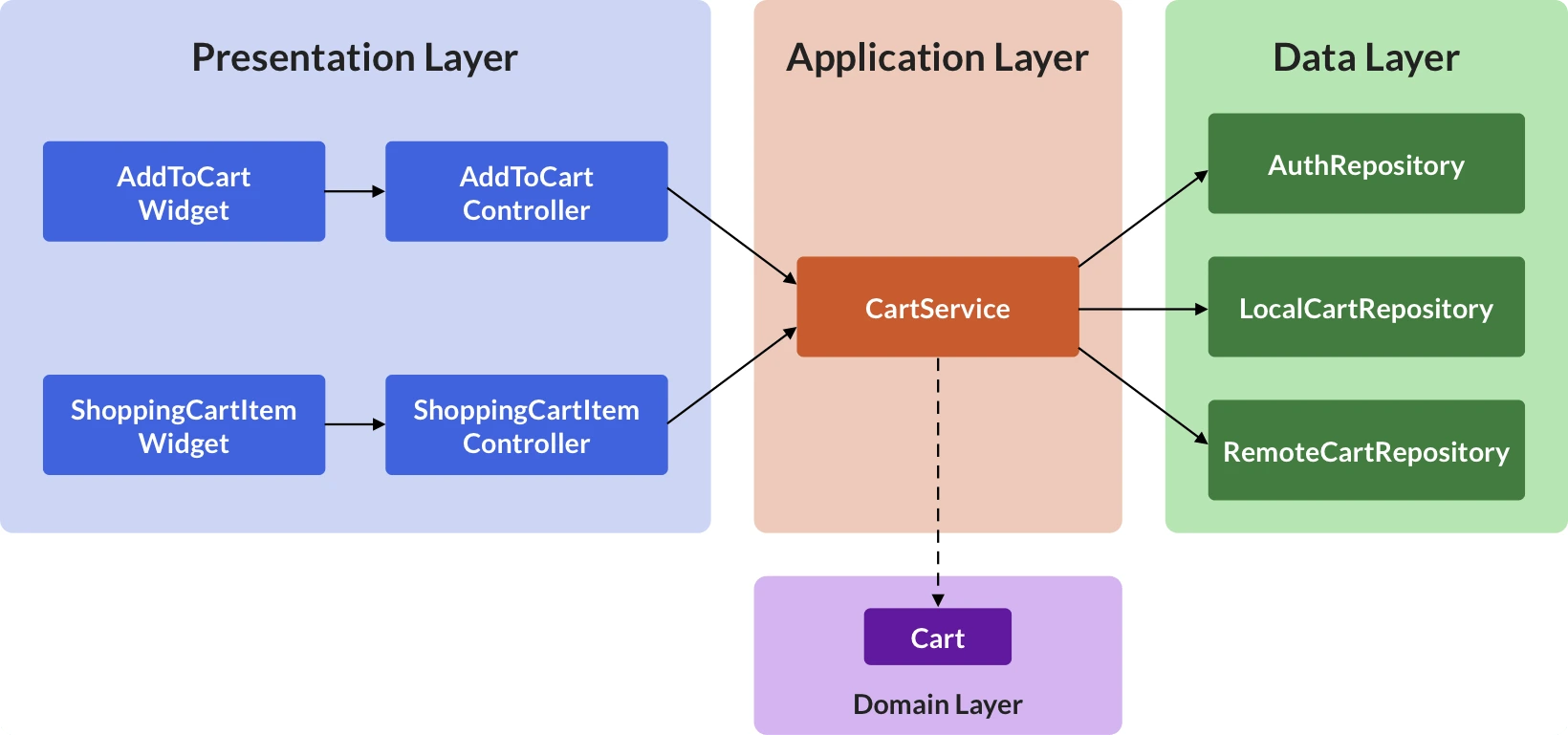
The basic architecture is outlined by an image they made, but I think it is best understood when combined with their practical example.
| Architecture | Example |
|---|---|
 . . |
 |
Simple explanation
So as a very quick overview:
- Domain (IMO not a layer): all necessary models which may be used across the app
- Data layer: access apis, and offer these as easy-to-use repositories
- Application layer: optional layer which provides easy-to-use methods for interacting with apis, both as read and write
- Presentation layer: also called UI layer, because it maintains state for displaying to the user, and handles user input
Detail
Domain
This "layer" is very simple, and I think that the explanation from Andrea needs to additional clarification:
The primary role of the domain layer is to define application-specific model classes that represent the data that comes from the data layer.
Model classes are simple data classes and have the following requirements:
- They are always immutable.
- They contain serialization logic (such as
fromJsonandtoJsonmethods).- They implement the '==' operator and the 'hashCode' method.
Data layer
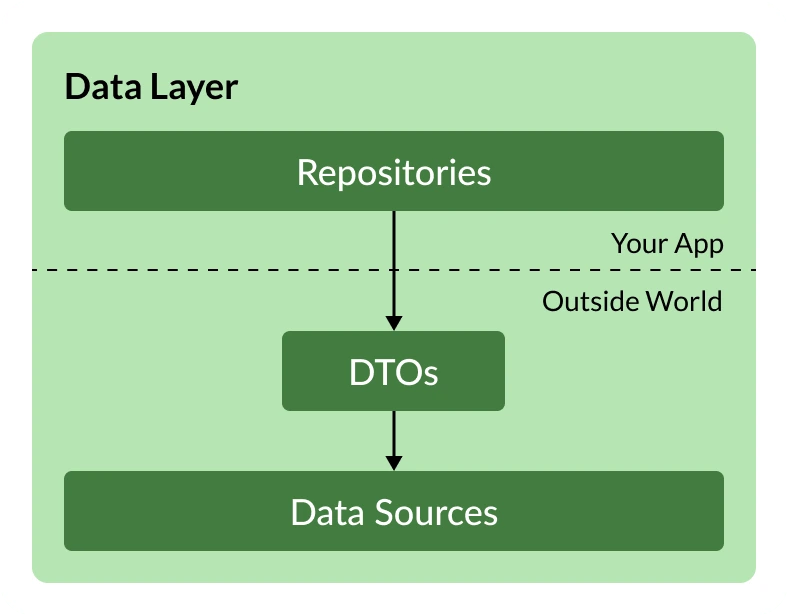
Here we begin with the foundation of the app, the data source.
This might be a database, or an API.
The data source is responsible for fetching the data, as some DTO or as unstructure JSON, for example.
The repository is then responsible or converting this into a format that can be used in the application.
So data-source gives dto to repo, repo gives model to other layers.
Application layer
This layer is optional. In simple applications, it may not be necessary to create an application layer. If you are building a TODO app, potentially all you need is CRUD methods, which are represented by the repository. However, once you get into more complex apps, you will need services to handle additional logic. For example if your TODO app adds multi-user support with dynamic permissions, you will need services which check which features are allowed for which users.
Presentation layer
The arguably most complex layer is the presentation layer. This contains the UI, as well as any state required by it.

This UI can once again be split into 2 parts:
- the view: display application state, and accept user input
- the controller: manage application state, and execute operations from user input
UI vs application state
It is important to note that Flutter also has the StatefulWidget, which is a widget that maintains state between builds.
This is somewhat confusing, so it is important to explain what state belongs where.
The idea here is that there is application state, and UI state. Application state is maintained and updated as necessary. The UI state is only for a single page or view, and is lost when the view is no longer available.
For example, if I am on the login page, there are 2 fields for username and password. The UI state, is the currently entered values. The application state would be the current login state (not logged in), and maybe the default value for username, from the previous login. The UI would read the application state, decide to display the login, read the previous user, and enter their username into the field. Then, when the user enters a password, this is stored in the UI state. When the user clicks login, the UI passes the credentials to the controller, which takes care of passing it on to the application layer. At this point, the page might redirect to a loading screen, and all UI state is lost. However, the application state remains. Once the login request has finished, the controller is updated to now store login state: logged in.
Project Structure
Overview
There are multiple approaches, but I'm not going to bother explaining the one(s) that I don't want to use. What I am interested in is the Feature-first structure. This is based on Andrea's explanation. Feature first basically means that the various architectural layers are organized as folders within feature folders.
Detail
The structure
As mentioned above, feature first means you have folders for your features (not pages / widgets, more on that later). Within these folders you then have your architectural layers. Honestly, it's easiest just to look at it:
‣ lib
  ‣ src
    ‣ features
      ‣ feature1
        ‣ presentation
        ‣ application
        ‣ domain
        ‣ data
      ‣ feature2
        ‣ presentation
        ‣ application
        ‣ domain
        ‣ data
Real world considerations
One minor drawback is that you may have shared elements, which means in practice you also have additional folders:
‣ lib
  ‣ src
    ‣ features
      ‣ feature1
        ‣ presentation
        ‣ application
        ‣ domain
        ‣ data
      ‣ feature2
        ‣ presentation
        ‣ application
        ‣ domain
        ‣ data
    ‣ common
        ‣ presentation
        ‣ application
        ‣ domain
        ‣ data
    ‣ utils
Feature-first is not about the UI
I highly recommnd reading Andrea's post about feature-first not meaning page-first or widget-first. It is definitely easy to think this, and end up with some not-so-nice folder structures.
No comments to display
No comments to display